

Best House Sitting Apps 2026: 5 Platforms Ranked for Nomads
Home > House Sitting Guide > Best House Sitting Apps 2026
Quick Facts
| Platform | Dedicated app | Push notifications | Mobile experience |
|---|---|---|---|
| TrustedHouseSitters | Yes — iOS and Android | Yes | Full app — apply, message, browse, map view |
| Nomador | No — mobile browser only | Email only | Mobile-friendly website |
| Aussie House Sitters | No — mobile browser only | Email only | Mobile-friendly website |
| MindMyHouse | No — mobile browser only | Email only | Mobile-friendly website |
| HouseCarers | No — mobile browser only | Email only | Mobile-friendly website |
| House Sitters UK | No — mobile browser only | Email only | Mobile-friendly website |
TrustedHouseSitters is the only dedicated house sitting app, and its push notifications are the real advantage: a five-applicant cap means strong listings in popular spots can fill within two to three hours. Every other platform is browser-only, so set immediate email alerts.
If you are interested in getting into house sitting, our book Travel More for Less puts the whole process in one place: clear, step by step guidance from your first questions to your first confirmed sit, and the reviews that open the door to the next one.
Why the App Experience Matters in 2026
TrustedHouseSitters and Nomador introduced a five-applicant cap on listings. Once five sitters have applied, the listing disappears from search results entirely. If you are managing your search from your phone, the difference between a platform with instant push notifications and one with email alerts only is the difference between getting the sit and missing it entirely. Email notifications arrive quickly, but push notifications through the THS app arrive the moment a listing goes live.
The best listings in popular locations can hit five applicants within two to three hours of going live. On a mobile browser without notifications, you are checking listings that have already gone. On the THS app with push notifications enabled, you know about the listing within seconds of it appearing. For full-time nomads managing their route from a phone, that edge is not theoretical.
TrustedHouseSitters App: The Only Dedicated House Sitting App
The map view is the feature that truly changes how you plan as a nomad. Nomador and Aussie House Sitters also offer map functionality on their mobile websites, but the THS app version feels more intuitive on a phone: touch to zoom, tap to open a listing, apply without leaving the map.
We were three weeks into a campervan trip through southern Italy. We had covered so much ground that the experience was starting to blur together, not from lack of enjoyment but from the sheer volume of it. We needed time to process. We caught a ferry from Italy to Albania and as we drove through the Balkans, Caro and I kept returning to the THS app, zooming into the map ahead of us, watching sit icons appear across the regions we were moving toward.
The day we crossed into Greece, we pulled over on a beach where a group of stray dogs had appointed themselves our guardians for the day, circling the van and happily accepting snacks in return for keeping other dogs away. Sitting there, Caro opened the THS app and found a two-week sit on Kefalonia, available three days ahead. We hopped on a video call that evening and within 20 minutes had the sit confirmed. That gave us just enough time to drive down the Greek coast, stop on Lefkada, and catch the ferry across. The map view did not just find us a sit. It shaped our entire route.
More recently, while crossing Serbia, we used the map again. We found our current 10-day sit in the south of France, and two more sits in Spain and Portugal that fit neatly into the route toward our upcoming six-month sit. We have essentially filled our spring with sits found by scanning ahead on the map rather than scrolling a list. For anyone travelling by van and planning their route around available sits, the app map view is the most practical feature on any house sitting platform.

What you can do entirely in the THS app: browse all listings including map view, apply for sits with a full application message, message homeowners and manage conversations, track active applications, and manage confirmed sits.
What still works better on desktop: initial profile creation and photo uploads, detailed profile editing, and some account settings. Once your profile is built, every sit from application to confirmation can be handled from the app.
Our ratings:
Notifications: 4 out of 5. They arrive reliably and quickly in most cases, though there is occasional lag. For a platform where speed matters, they do the job.
Usability: 4 out of 5. Searching and applying is simple. The map function is easier to use on mobile than on desktop. Scanning a region by touch feels more natural than clicking around a screen. The main frustration is being signed out regularly and having to re-verify the account, which adds friction when you want to act quickly on a new listing.
Speed: 4 out of 5. The app refreshes quickly and keeps up with browsing. The boot-up time could be marginally faster, but once it is open it performs well.
Features: 4 out of 5. Everything needed to find, apply for, and manage a sit is in the app. It occasionally lags behind the website when new features roll out, but for its core purpose it is complete.
Join TrustedHouseSitters with 25% off using our discount link. Standard and Premium memberships also include the 24/7 vet advice line, which we cover in our pet emergency guide.
Nomador: Best Mobile Browser Experience for Europe
Nomador does not have a dedicated app. It has a well-designed mobile-friendly website that works smoothly in Safari or Chrome, and you can browse listings, apply, and message homeowners entirely from a mobile browser. What you will not get is push notifications.
Nomador's mobile browser experience is the most polished of any non-app platform. The site loads quickly on mobile, the search filters work smoothly in Safari or Chrome, and the application flow from a phone feels close to native. Without push notifications, a home screen shortcut and a twice-daily manual check is the practical substitute.
Nomador does send email notifications when a new listing matches your saved search. To make these as fast as possible, make sure email notifications are turned on for your phone so the alert appears on your lock screen. It is not as immediate as a push notification, but it is a reliable second-best.
For any sit focused on Europe, Nomador belongs on your phone alongside THS. Our full platform comparison covers which platform suits which country if you are deciding where to focus your app notifications.
Platforms Without Dedicated Apps: What That Means in Practice
Aussie House Sitters, MindMyHouse, HouseCarers, and House Sitters UK are all mobile-friendly websites. All four work in a phone browser. You can apply for sits, message homeowners, and manage your profile on all of them from mobile. All four send email notifications for new listings matching your saved search. What none of them offer is push notifications.
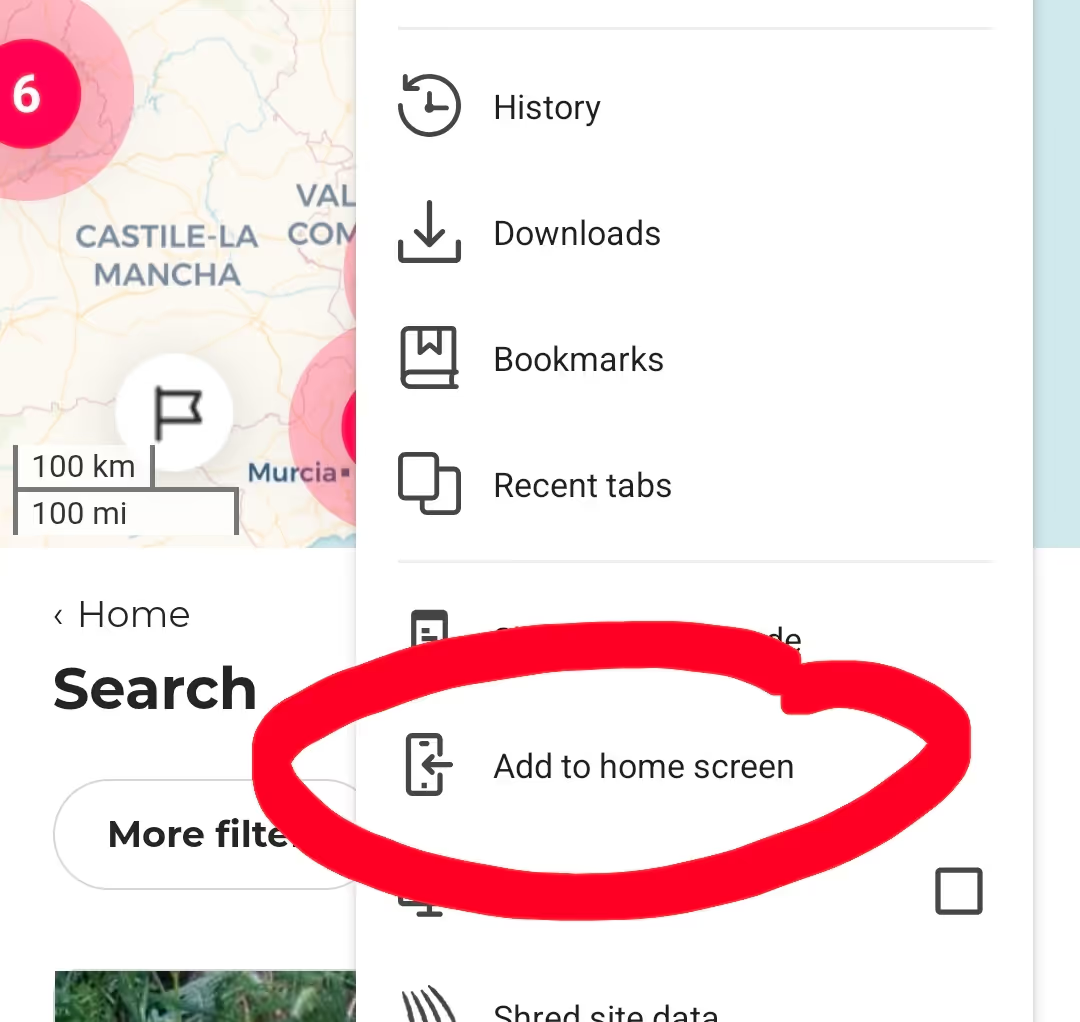
The practical workaround for any browser-only platform: add it as a shortcut on your home screen. In Safari or Chrome, open the platform website, tap the browser settings icon, and select "Add to Home Screen." This creates an icon on your phone that opens directly to the mobile site, exactly like an app. It works with every platform, takes ten seconds to set up, and means you are one tap away from checking for new sits rather than opening a browser and typing a URL.
For each platform, set up email alerts for new listings matching your search. This is the practical substitute for push notifications on any mobile browser platform. On THS the app notification gives you a meaningful speed advantage. On browser-only platforms, immediate email alerts get you close enough.
Aussie House Sitters and House Sitters UK both offer 15% off with code HSG15 at checkout. MindMyHouse and HouseCarers have no discount codes but are among the most affordable platforms available. For a full breakdown of what each platform charges for membership, see our house sitting fees guide.
How to Set Up Notifications So You Never Miss a Sit
This is the step most guides skip. Having the app installed is not enough. Notifications need to be actively configured.
For the TrustedHouseSitters app: open the app, go to Settings, and turn on push notifications. Then set up a Saved Search for your target location and dates and enable alerts for that search. The result is a push notification the moment a matching sit goes live. In the context of the five-applicant cap, being among the first to apply on a strong listing makes a real difference. Our guide to getting your first house sit covers what a strong application looks like once you have found the listing.
For Nomador: log in on your mobile browser, go to your saved searches, and enable email notification for each one. Add the Nomador notification email to your contacts immediately so it does not route to spam. A notification you do not see is the same as no notification.
For all non-THS platforms: find the saved search or alert feature in account settings and confirm you are set to immediate email notifications rather than daily digest. All major platforms including Nomador, Aussie House Sitters, House Sitters Canada, House Sitters UK, House Sitters America, Kiwi House Sitters, MindMyHouse, and HouseCarers support email alerts. The daily digest option shows you notifications 24 hours after a listing went live. Immediate is always the right setting.
Our personal setup: THS app on the home screen with push notifications on, and every other platform set to immediate email alerts with phone notifications enabled for our email app. That combination means any new listing on any platform appears on our lock screen within minutes.
Can You Manage House Sitting Entirely From Your Phone?
For TrustedHouseSitters: yes, almost entirely. The app covers the full application and communication process. The only tasks that truly need a desktop are initial profile creation and photo uploads. Once your profile is set up, every subsequent sit can be found, applied for, and managed from the THS app.
For all other platforms: yes, through a mobile browser. The experience is functional but less smooth than a dedicated app. Applying from your phone on Nomador or Aussie House Sitters works, but expect slightly more friction than the THS app delivers.
For full-time nomads managing everything from a phone: this is realistic on THS. Build your profile on desktop once, then manage everything from the app. We travel with a laptop but have used the THS app exclusively for weeks at a time. It handles everything we need on the road.
The video call with a homeowner is the one step that benefits from a larger screen: easier to show your face clearly and read their body language. Everything before and after the call works fine on a phone.
Which Mobile Setup Is Best for Your Situation
| Situation | Recommended setup |
|---|---|
| Full-time international sitter | THS app with push notifications on |
| Europe and France focused | Nomador mobile browser shortcut + email alerts |
| Australia focused | Aussie House Sitters mobile browser + email alerts |
| Managing multiple platforms | THS app for notifications, others via email alerts |
| No laptop, phone only | THS app — most complete mobile experience available |
| New sitter building first reviews | THS app — map view helps find local sits nearby |
Getting Started: From Download to First Application
Download the TrustedHouseSitters app from the App Store or Google Play. Create your profile on desktop first: photo uploads and bio writing are easier on a larger screen. Turn on push notifications immediately after logging in on the app. Set up a Saved Search for your first target location and dates and enable alerts for that search. Browse the map view to see what is available in your area. Apply for your first sit from the app. A full application message is possible entirely within the app, no desktop needed.
For Nomador and other platforms: create your account and profile on desktop, bookmark the mobile site on your phone home screen, and set up email alerts before you start browsing.
Our guide to what to ask a homeowner covers what to say once you have the conversation, and our first house sit guide walks through building the profile that gets you accepted in the first place.
Conclusion
TrustedHouseSitters is the only house sitting platform with a dedicated app and push notifications. In a market where the best listings fill within hours under the five-applicant cap, that is a meaningful practical advantage for any sitter managing their search from a phone. Every other platform offers email notifications for new listings and a mobile-friendly website. TrustedHouseSitters adds push notifications on top of that through its dedicated app, which is the meaningful practical difference for sitters managing their search from a phone.
The setup that works for us: THS app with push notifications on as the primary tool, Nomador mobile browser with email alerts for European sits, and browser-only platforms checked twice daily through email notifications. That combination gives you push notification speed on THS and email notification coverage on every other platform.
If you are joining TrustedHouseSitters for the first time, use our 25% discount link. It applies automatically at checkout. DM us @housesittersguide on Instagram with questions about the app or mobile setup. We answer everyone.

Frequently Asked Questions
Is there a TrustedHouseSitters app?
Yes : TrustedHouseSitters has a dedicated iOS and Android app with push notifications, map view, and full application management. It is the only dedicated house sitting app available. All other major platforms operate through mobile-friendly websites rather than native apps. Download it from the App Store or Google Play and turn on push notifications before setting up your first saved search.
Can you apply for house sits from your phone?
Yes, on every major platform. TrustedHouseSitters handles the full process in its app: writing application messages, messaging homeowners, and managing confirmed sits. Nomador, Aussie House Sitters, MindMyHouse, HouseCarers, and House Sitters UK all work through mobile browsers and support applications from your phone, though without push notifications.
Do other house sitting platforms have apps?
No : TrustedHouseSitters is the only house sitting platform with a dedicated mobile app. All other platforms including Nomador, Aussie House Sitters, House Sitters UK, MindMyHouse, and HouseCarers offer mobile-friendly websites. These work well in a phone browser but do not provide push notifications.
Does TrustedHouseSitters have a map view on the app?
The THS app map shows all available sits plotted on a live map, which you can zoom and scroll to plan your route. Nomador and Aussie House Sitters also offer map views on their mobile websites, but the THS app version is the most intuitive to use on a phone. We used it to find sits while driving through Europe, scanning the map ahead of us as we moved.


Responses
What are your thoughts on this post?