

Home > Blog > A Portable Second Screen for House Sitting Productivity
Quick Facts
| Quick Facts | |
|---|---|
| What Caro bought | A 15.6 inch USB-C portable monitor, thin and lightweight |
| Cost range to expect | Roughly 40 to 100 euros for something perfectly usable |
| Power requirement | None separate, powered through the same USB-C cable as the laptop |
| Setup | Laptop on the desk, monitor raised on a stack of books to eye level |
| Best suited for | Sits of a month or longer, where setting up a proper desk space is worth it |
A second screen sounds like a small upgrade, but on a long house sit it changes how your whole day feels. Caro recently added a portable USB-C monitor to her setup, and the difference has been less about getting more done and more about how much better it feels to actually sit down and do it. Here's what she got, what it cost, and how the setup works in practice.
Caro and I are a month into a six-month sit in Portugal, looking after one cat and four chickens. Caro runs carosclass.com, a German teaching resource site, and sells materials on Eduki, which means she spends a lot of her day moving between research, content creation, and managing her Instagram and website.
If you are interested in getting into house sitting, our book Travel More for Less puts the whole process in one place: clear, step by step guidance from your first questions to your first confirmed sit, and the reviews that open the door to the next one.
What She Actually Bought
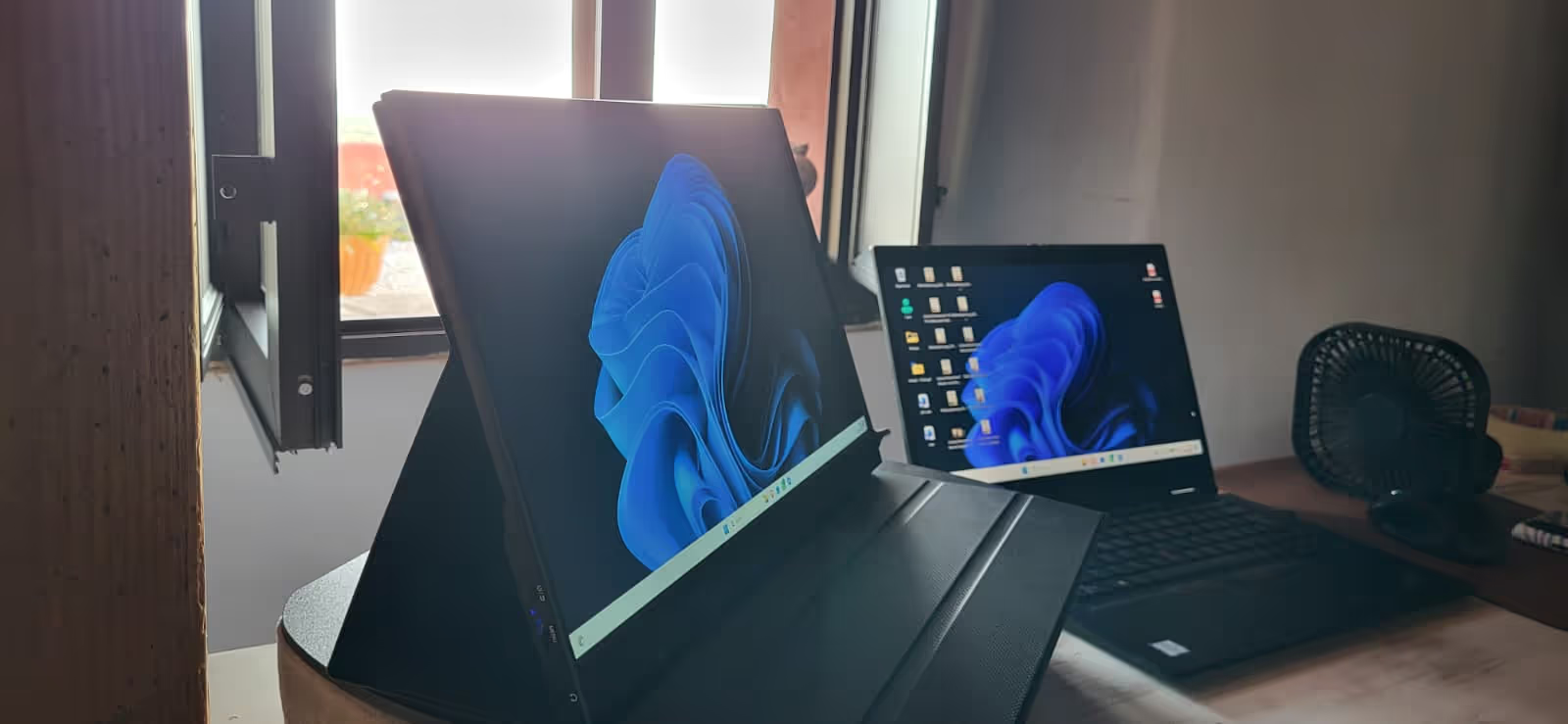
The monitor is a 15.6 inch screen from a brand called Denver, bought through AliExpress. It's thin, light, and connects entirely via USB-C, both for power and display, so there's no separate charger or cable to carry. That single-cable setup is the main reason it works so well for travel. One cable from the laptop to the monitor, and everything is running.
If you search for a portable monitor on Amazon, AliExpress, or similar sites, you'll find dozens of options in the 40 to 100 euro range that will do exactly this job. The market is full of 15.6 inch, USB-C, IPS panel monitors at this price point, and most of them work the same way: plug in, extend your display, done. You don't need to spend more than that unless you have specific requirements like 4K resolution or a larger screen size.
Caro's main laptop has a 14 inch screen, which she's used for years and found genuinely practical for travel. The portable monitor isn't replacing that. It's sitting alongside it as a second, separate desktop, not a mirrored display. This means she can have completely different things open on each screen rather than just a bigger version of the same thing.
The Setup in Practice
The physical setup is almost embarrassingly simple, which is part of why it works.
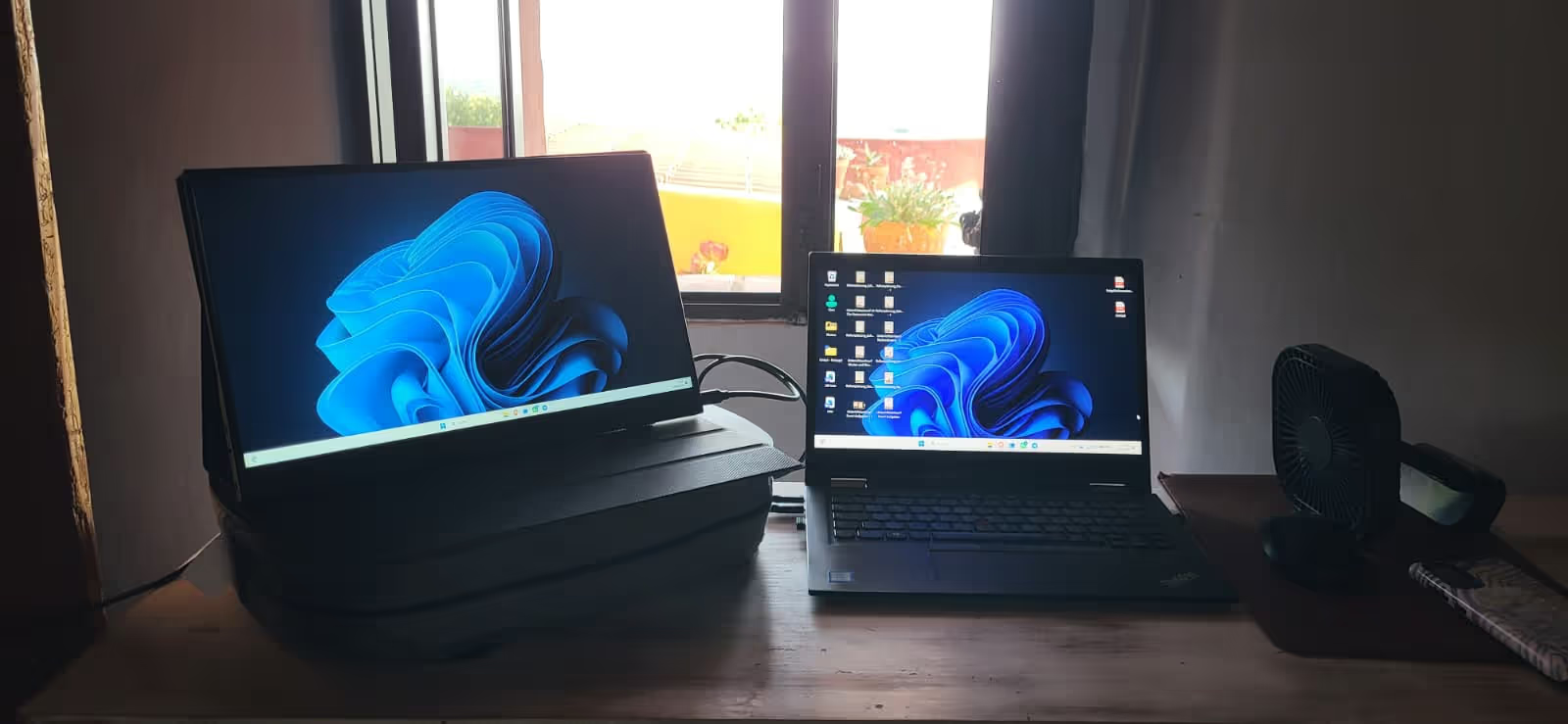
Instead of working from the couch, which had been the default for shorter sits, Caro now sits at a table. The laptop sits on the desk directly in front of her for typing. The portable monitor sits on a raised platform made from a stack of books, positioned at eye level and slightly to her left.
That height adjustment is doing more work than it sounds like. Looking slightly across and at eye level, rather than down at a laptop screen, encourages a straighter sitting position without any conscious effort. Caro hadn't had specific neck or back problems before this, but the logic is straightforward: the more time you spend hunched over a laptop, the more that posture becomes a habit, and habits formed over months of travel are hard to undo later. Fixing the ergonomics now, when it costs nothing but a stack of books and a 40 euro monitor, is cheaper than dealing with the consequences down the line.
For anyone setting up a similar arrangement, the principle that matters most is getting the second screen to eye level. A laptop stand, a stack of books, anything that lifts the monitor so you're looking across rather than down will make a noticeable difference to how long you can comfortably work.
How the Two Screens Get Used
The way Caro splits her work between the two screens is specific to what she does, but the underlying logic is one that most remote workers will recognise.
The main laptop screen is where the actual creation happens: writing, designing materials for Eduki, editing content for the website. The portable monitor is used for research, reference material, and anything she needs visible while working on the main screen, browser tabs, source material, reference images, whatever the task requires.
This division means she's not constantly switching between windows or losing her place when she needs to check something. The information she needs is just there, on the other screen, the whole time.
Caro's take on this, and it's a fair one, is that the exact split is going to be different for everyone. The value isn't in copying her specific workflow. It's in having the option to separate "the thing I'm working on" from "the thing I need to see while working on it." Once you have two screens, you'll figure out fairly quickly what makes sense for your own work. Our home office setups for house sitters article covers the broader question of building a workspace during a sit, of which a second screen is one piece.
Is It Worth Carrying a Second Screen While Traveling?
This is really a question about sit length.
For a short sit, a few days to a week, the extra item in your luggage probably isn't worth it. You're not going to be sitting at a desk long enough to benefit much from the upgraded setup, and the priority is usually traveling light.
For a longer sit, a month or more, the calculation changes. You're going to be sitting somewhere working most days for weeks, and small improvements to comfort compound over that time. A 15.6 inch monitor that weighs under a 300 grams and is flat in a laptop bag is a minor addition to your luggage for a meaningful daily improvement.
For Caro and me specifically, traveling in our VW T4 campervan between sits, the portability matters as much as the functionality. A screen that needs its own power brick, a separate charging cable, or a bulky stand would be a different proposition.
The fact that this one runs entirely off a single USB-C cable, shared with the laptop's existing setup, means it adds almost nothing to what we're already carrying. It's the kind of upgrade that works because it doesn't ask you to compromise on the travel-light approach that makes campervan and house sitting work in the first place.
What to Look For If You're Buying One
If this has convinced you to look into a portable monitor for your own setup, here's what actually matters based on Caro's experience and the wider market.
USB-C with both power and video over a single cable is the feature that makes this genuinely portable. Anything that requires a separate power adapter defeats much of the purpose for travel.
15.6 inches is a sensible size. Big enough to be genuinely useful as a second screen, small enough to pack flat in most laptop bags. Larger options exist, up to 17 or even 27 inches, but they start to work against the portability that makes this useful for van life and house sitting in the first place.
A protective case that doubles as a stand is common at this price point and worth looking for, since it means one less thing to pack separately. That said, Caro's setup of a stack of books works perfectly well, so don't let the absence of a built-in stand put you off if the price is right.
Resolution and colour accuracy matter more if your work involves design, photo editing, or anything visual. For general productivity, research, browsing, and writing, even budget options in the 40 to 60 euro range will be more than sufficient.
Conclusion
A portable monitor is a small, cheap addition to a travel setup that makes a disproportionate difference on longer sits. Caro's version cost somewhere in the 40 to 100 euro range that's typical for this category, weighs almost nothing, runs off the same cable as her laptop, and has changed where and how she works during this six-month sit. The biggest benefit isn't more screen space in the abstract. It's the combination of better posture, a proper desk setup, and the ability to separate research from creation, all from an item that fits flat in a laptop bag.
If you're on a long-term sit and you've been working from a couch or a cramped corner of a kitchen table, this is one of the cheapest upgrades you can make to how your days actually feel.
Caro and I have completed 20 house sits across 12 countries, driven 19,000km in Australia and 24,000km in our 1998 VW T4, and saved over $26,500 in accommodation costs over three years of house sitting. If you have questions about setting up a workspace for a long sit, send us a message on Instagram, we read every DM.

Frequently Asked Questions
Do I need a separate power source for a portable USB-C monitor?
No, if you choose a USB-C monitor designed for this purpose. Power and video both run through the same cable connecting the monitor to your laptop, so there's nothing extra to carry or plug in. This is the feature that makes these monitors genuinely useful for travel rather than just a desk accessory.
How much does a portable monitor for travel cost?
A perfectly usable 15.6 inch USB-C portable monitor typically costs between 40 and 100 euros from retailers like Amazon or AliExpress. Caro's is a budget brand bought through AliExpress and has worked well for general productivity, research, and content creation. You don't need to spend more unless you have specific needs like higher resolution for design work.
Is a second screen worth bringing on a house sit?
It depends on the length of the sit. For short sits, the extra item probably isn't worth packing. For sits of a month or longer, the daily improvement to comfort and workflow adds up, and a lightweight USB-C monitor that folds flat adds very little to your luggage for a meaningful benefit.
How should I position a portable monitor for better posture?
Raise it to eye level, slightly to the side of your main screen. Caro uses a stack of books as a stand. Looking across at eye level rather than down at a laptop encourages a straighter sitting position without any conscious effort, which matters more the longer you spend at a desk each day.
Can a portable monitor work alongside a campervan and house sitting lifestyle?
Yes, particularly because of how light and simple these monitors are. A 15.6 inch USB-C monitor that runs off the same cable as your laptop adds almost nothing to what you're already carrying, which fits naturally with the travel-light approach that makes combining van life with house sitting practical.


Responses
What are your thoughts on this post?