

Home > Blog > How to Cancel a House Sit on TrustedHouseSitters
Quick Facts
| Feature launched | April 14, 2026 |
| Where to find it | The chat thread with the pet parent, on the latest app or the website |
| Cancellation policy changed? | No |
| Membership refund window | 14 days from joining or auto-renewal, and it lapses once you apply for a sit or confirm a booking |
| Booking fee | In full whenever a booking is cancelled, whichever side cancels |
| Can you leave a review after cancelling? | No. Reviews require a completed sit |
| What happens to the sit dates | Automatically relisted for new applicants |
| Sit Cancellation Plan | Premium tier only, for sitters and pet parents, up to $1,500 |
Since 14 April 2026 sitters can cancel a confirmed TrustedHouseSitters sit themselves, via the cancel option inside the chat thread with the pet parent. The policy has not changed: cancel only in extraordinary circumstances, and talk to them first. Your booking fee is refunded in full.
TrustedHouseSitters has introduced a new cancellation feature for sitters, announced on April 14, 2026. For the first time, sitters can cancel a confirmed sit directly through the app or website, without contacting Membership Services or waiting for the pet parent to initiate anything. It brings the sitter experience in line with the options already available to homeowners, and it is a welcome change.
Cancellations are rare in house sitting, and the overwhelming majority of sits go exactly as planned. But when something unexpected happens, knowing how to handle a cancellation correctly protects you, the pet parent, and your profile on the platform.
What Has Changed
Until now, sitters who needed to cancel a confirmed sit had two options: contact Membership Services directly, or work through the pet parent. Neither was fast, and both placed an unnecessary burden on all parties. THS has addressed this by introducing a direct cancellation flow for sitters on both the app and website.
The cancellation button lives inside the chat thread between you and the pet parent. The logic is sound: the chat is where your entire relationship with that homeowner lives, and placing the cancel option there serves as a natural nudge to have a conversation before proceeding. When you cancel, you also have the option to leave a private note for the Membership Services team explaining your circumstances. Worth using if your situation is sensitive or if you want something on the record.
This change mirrors what pet parents have been able to do for some time and brings a welcome consistency to the platform. THS has been clear that the policy itself has not changed alongside this new feature. For a broader look at how THS works, our TrustedHouseSitters review covers the platform in full.
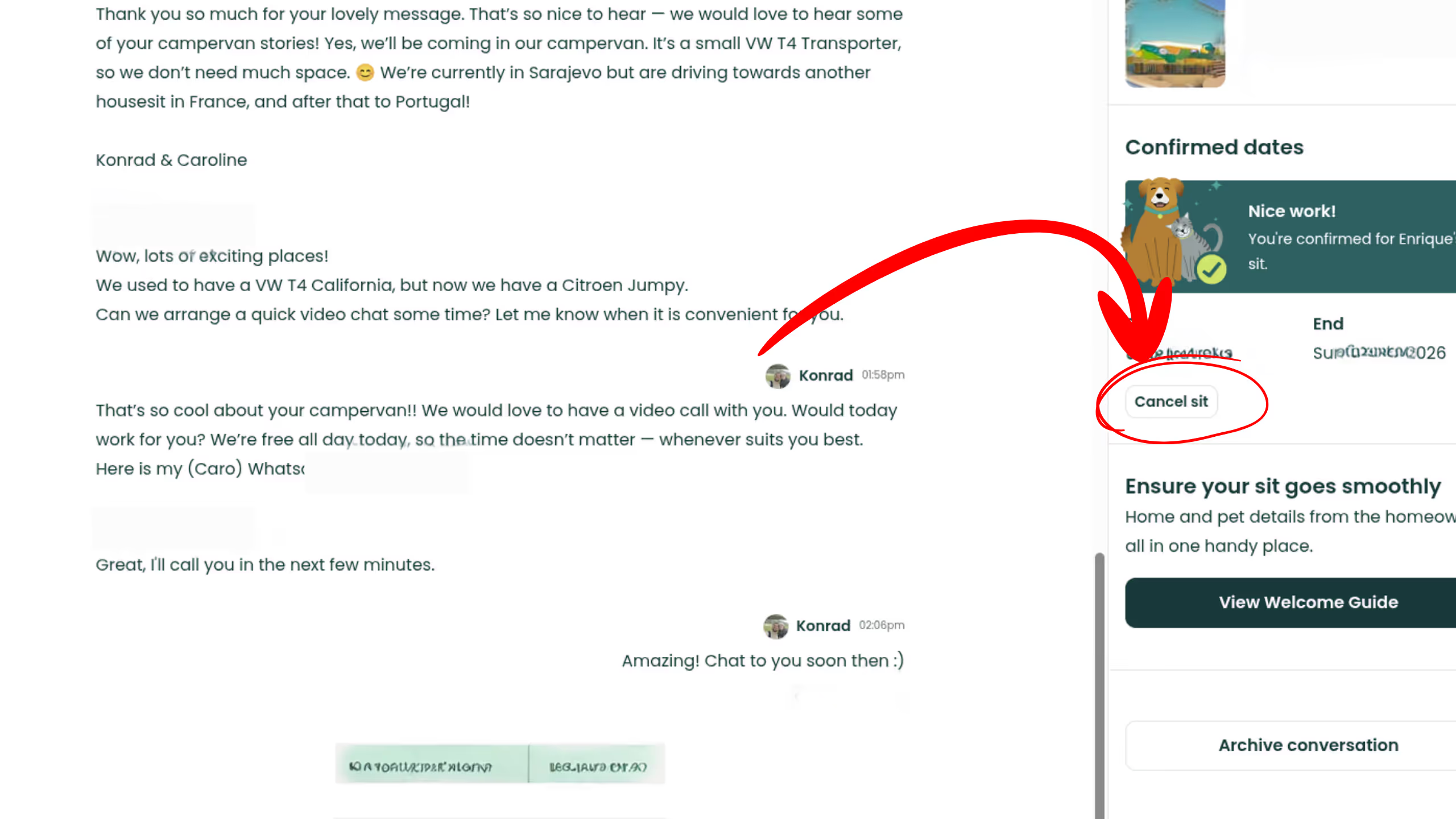
How to Cancel a House Sit: Step by Step
Make sure your app is up to date first. TrustedHouseSitters requires the latest version to access the new cancellation feature. When we updated the app ourselves on the day of the announcement, we were not yet able to locate the cancel button, so the rollout may still be in progress on some devices. If you cannot find it after updating, try the website version, or contact Membership Services directly in the meantime.
Once the feature is visible: open the TrustedHouseSitters app or website and navigate to your confirmed sit. Go into the chat thread with the pet parent for that sit and look for the cancel option within the conversation. Before you tap it, send the pet parent a direct message explaining what is happening. THS actively encourages this step, and it is the right thing to do regardless of the circumstances.
When you proceed with the cancellation, you will have the option to leave a private note for the Membership Services team. After confirmation, the pet parent receives a notification and the sit dates are automatically relisted for new applicants without the homeowner having to do anything. If you use a calendar to coordinate multiple sits, update your schedule as soon as the cancellation goes through.
Before You Hit Cancel
The most important step happens before you touch the cancel button. Contact the pet parent directly and tell them what is happening. This is not just good etiquette: it is part of the TrustedHouseSitters code of conduct that every member agrees to when they join. A pet parent who hears from you personally has time to start making alternative arrangements, reach out to previous applicants, or ask a neighbour before the listing even goes live again.
Most homeowners respond to honesty with genuine understanding. When we had to shorten a sit in Lullin, France, by a day after a family member became seriously ill, the homeowner was accommodating from the moment we explained the situation. Difficult circumstances are handled far better through a direct conversation than through a formal process. The sooner you communicate, the more options the other person has.
If you want to understand what kind of communication builds that trust from the start, our guide on what to ask a homeowner before you house sit explains how to lay the right groundwork during the video call stage.

What Counts as an Extraordinary Circumstance
The cancellation policy has not changed. A confirmed sit should only be cancelled in extraordinary circumstances, or if both parties agree. THS does not publish a precise list of what qualifies, but the community and Membership Services treat the following as clear grounds: a death in the family, a serious illness or hospitalisation, and situations where a sitter is physically unable to travel: a border refusal, a cancelled flight with no viable alternative, a medical emergency.
What does not qualify, and where you are likely to face scrutiny, is cancelling because of a disagreement with the homeowner, a change of personal preference, or because a better sit came along. The same standard applies in reverse: a pet parent cancelling because a family member decided to stay home, or because a casual conversation made them uncomfortable, is not an extraordinary circumstance. Unfortunately this kind of cancellation does happen. If you are on the receiving end of it, our article on recovering from a house sit cancellation covers your practical next steps.
It is also worth reading our conflict resolution guide if the cancellation is connected to a broader disagreement with the homeowner.
What Cancelling a Sit Costs You
Cancelling a sit can cost you money you have already paid, because TrustedHouseSitters sells two separate things with two separate refund rules. One is the subscription that lets you use the platform. The other is the booking fee charged when a sit is confirmed. A cancellation does not undo either of them automatically.
The subscription fee is refundable for 14 days from your activation date, or for 14 days after an auto-renewal payment, but only if you have not applied for a sit, confirmed a booking, or published live dates on a home listing in that window. Doing any one of those closes the window early. Outside it the subscription is not refundable, and their terms add that if they terminate your membership for breaking the rules, nothing is refunded at all.
The booking fee has its own rule, and it is more forgiving than the subscription. You are only charged it once a sit is confirmed, and their Booking Fee Cancellation Policy says it is refunded in full whenever a booking is cancelled, whichever party initiates it, back to the original payment method. Their terms call the fee non-refundable everywhere else and treat that policy as the exception, so what matters is the version that was in force when your booking was confirmed. Our booking fee breakdown works through what it costs across a year of sitting.
Cancelling a sit does not stop your membership renewing. Auto-renewal has to be switched off at least 7 days before the renewal payment date, either in the membership section of your account or by emailing their support address. They send a reminder email at least 30 days before the charge, so there is plenty of warning if you want to stop it.
Their terms also exclude liability for the income you lose and the extra costs a cancelled sit creates, which is why travel insurance matters more than most sitters assume when they first join.
The one cancellation with no way back is leaving a sit early. The terms say you must not do that under any circumstances, especially where a pet would be left unattended, without informing the pet parent and giving them reasonable time to arrange alternative care. Break that rule and the terms state that you receive a lifetime ban from the platform, with no refund of any membership fees paid.
How Cancellations Affect Your Profile and Reputation
If a sit is cancelled before it starts, neither party can leave a review. Reviews on TrustedHouseSitters must relate directly to a completed sit, so a cancellation removes the review opportunity for both sides. That is fair, but it does leave a transparency gap.
Our view is that THS would benefit from displaying a cancellation rate on member profiles. A sitter who has cancelled multiple sits without clear cause should carry some visible indication of that, just as a pet parent who repeatedly cancels should. Currently there is no such signal on either side. It is something worth watching as the feature develops.
In practical terms, a single cancellation in real extraordinary circumstances will not appear anywhere on your profile and will not affect your review score. What matters most is how you handle it. If you are ever on the receiving end of a difficult review connected to a cancellation dispute, our guide on handling a negative review on a house sitting site has useful advice on responding constructively.
What If a Pet Parent Cancels on You
This new feature is specifically for sitters, but pet parent cancellations are worth addressing because they affect your plans just as significantly. We have had a sit cancelled when a homeowner's adult son decided he wanted to stay at his mother's house rather than his own apartment. The only practical response was to accept it and move on. Refusing or pushing back would have risked a poor review and gained nothing.
If a pet parent cancels and you believe it falls outside the code of conduct, contact THS Membership Services to flag the situation. THS may investigate if the cancellation appears to violate platform rules, and that process can result in action against the pet parent's membership. Keep a record of any conversation in the lead-up to the cancellation, particularly if the homeowner's reasoning seems thin or pretextual.
Our Experience: Shortening a Sit in Lullin
We came close to a full cancellation during a sit in Lullin, France, caring for two outdoor cats named Piton and Muscaton. A family member became seriously ill and we were not sure whether we would have the chance to see them if we did not leave quickly. We contacted the homeowner immediately, explained what was happening, and together we worked out a solution: we left one day early, and the homeowner arranged for a neighbour to feed the cats that day. Both cats were independent and the arrangement worked well for everyone.
What made that situation manageable was the conversation. We did not wait and hope things would resolve. We explained what we were facing, the homeowner responded with understanding, and we found a middle ground that worked. That is exactly how difficult situations should be handled on a platform built on trust.
If you are thinking about long-term house sitting, the relationship you build during initial contact makes a real difference when the unexpected happens. A homeowner who feels respected and well-informed is far more likely to meet you halfway.
Conclusion
The new TrustedHouseSitters cancellation feature is a welcome and long-overdue addition that treats sitters as equal participants rather than the party that always needs to ask for permission. The cancel button is placed inside the conversation where the relationship already lives, and the auto-relisting of sit dates means pet parents lose as little time as possible finding a replacement.
The policy has not changed. Cancellations should be rare, should happen only in real extraordinary circumstances, and should always be preceded by a direct conversation with the pet parent. If you are new to TrustedHouseSitters and want to understand the platform before your first sit, our getting started guide is a good place to begin.
We are Konrad and Caro, full-time travelling house sitters with 20 completed sits across 12 countries. If you have a question about cancellations or anything else house sitting related, DM us @housesittersguide on Instagram. We answer everyone.

Frequently Asked Questions
Has TrustedHouseSitters changed its cancellation policy?
No. The policy remains the same: a sit should only be cancelled in extraordinary circumstances, or if both parties agree. What has changed is the process. Sitters can now initiate a cancellation directly through the app or website rather than contacting Membership Services.
Where is the cancel button on TrustedHouseSitters?
Inside the chat thread between you and the pet parent, available on both the app and website. You will need to update your app to the latest version to access it. If you cannot find it after updating, try the website version or contact Membership Services directly.
Can I leave a review if I cancel a sit?
No. If a sit is cancelled before it starts, neither the sitter nor the pet parent can leave a review. Reviews on TrustedHouseSitters must relate to a completed sit.
Will I get a refund on the booking fee if I cancel?
Yes, in full, whichever side cancels. You are only charged the booking fee once a sit is confirmed, and their Booking Fee Cancellation Policy says it is refunded in full whenever a booking is cancelled, regardless of who initiates it. The refund goes back to your original payment method, and the version of the policy that was in force when your booking was confirmed is the one that applies.
What is the TrustedHouseSitters Sit Cancellation Plan?
A Premium benefit that can pay out when a sit is cancelled at short notice. It is open to premium tier pet parents when a sitter cancels, and to premium tier sitters when a pet parent cancels, with payment of up to $1,500 considered at TrustedHouseSitters' own discretion. It is not an insurance policy, and it is not available to co-sitters. Our subscriptions and insurance guide explains the conditions in full.
Can I cancel a sit that is already in progress?
Their terms allow it only in extraordinary circumstances, and never silently. If something serious happens mid-sit, tell the pet parent immediately and give them reasonable time to arrange alternative care, then contact Membership Services so the sit can be updated on both accounts. The terms are blunt about the alternative: leaving a sit early without informing the pet parent, especially where that leaves a pet unattended, means a lifetime ban from the platform with no refund of any membership fees paid.
What should I do if a pet parent refuses to agree to a cancellation I need?
Use the cancellation feature and put your reason in writing. The private note for Membership Services is where you record what happened, and it is the record that counts if your reason is ever questioned. Keep the conversation with the pet parent civil even when they are upset, because the terms still hold you to the standard of extraordinary circumstances.
Do I get my membership fee back if I cancel a sit?
No. The membership and the sit are separate. Your subscription is only refundable within 14 days of your activation date or of an auto-renewal payment, and only if you have not applied for a sit, confirmed a booking, or published live dates on a home listing in that window. Cancelling a sit afterwards does not reopen it.
Does cancelling a sit stop my membership auto-renewing?
No. Auto-renewal has to be switched off deliberately. Cancel at least 7 days before the renewal payment date, either in the membership section of your account or by emailing their support address. They send a reminder at least 30 days before the charge, and if you miss the deadline the payment goes through.


Responses
What are your thoughts on this post?